
You have the App Service plan shown in the following exhibit.
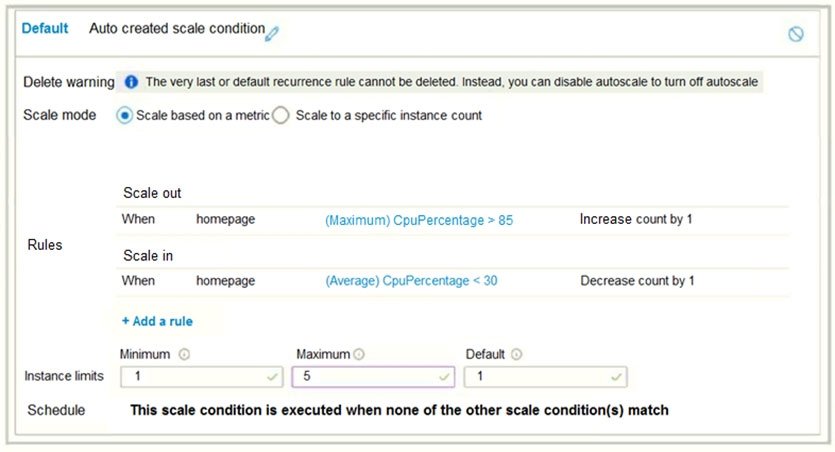
The scale-in settings for the App Service plan are configured as shown in the following exhibit.
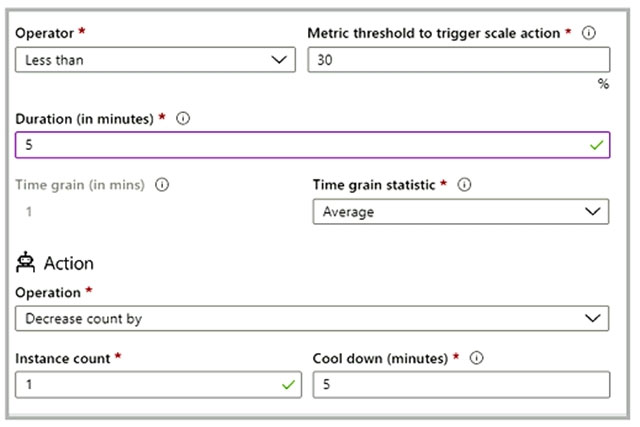
The scale out rule is configured with the same duration and cool down tile as the scale in rule.
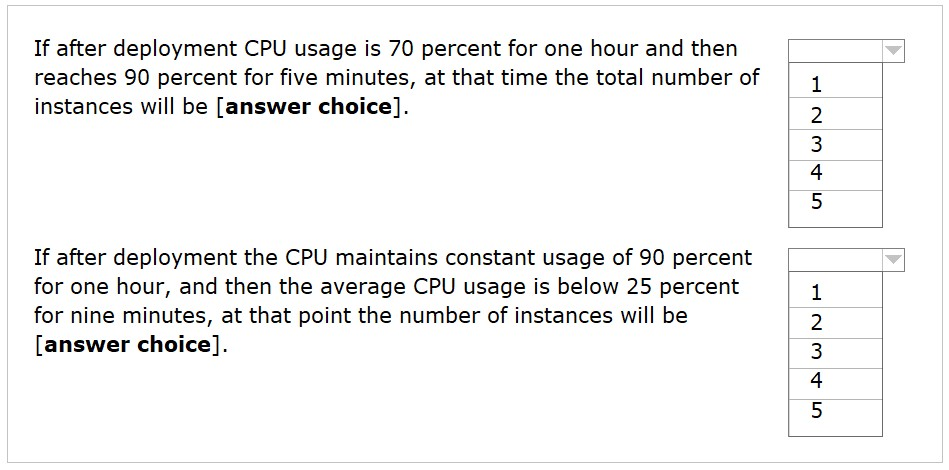
Use the drop-down menus to select the answer choice that completes each statement based on the information presented in the graphic.
NOTE: Each correct selection is worth one point.
Hot Area:
Correct Answer:
Box 1: 2
70% for 1h, and then 90% for 5 minutes. So, from the default of 1 it will scale out out 1 more. So, 2 in total.
Box 2: 4
90% for 1h and then 25% for 9minutes. So, from the default of 1 it will it scale in to the max 5 (60/5 = 12, which means 6 times scale out, because we have 5 minutes period of cool down). Then when it drops to 25% for 9 minutes and it will scale in once after 5 mins (since the average of the last 5 minutes is under 30% ), so it will decrease by 1, so 4 in total. Then it will have a cooldown of 5 minutes before scaling in again, but since only 4 minutes left from 9 minutes (9-5 = 4), it won’t scale in again. So, 4 in total.
Reference:
https://docs.microsoft.com/en-us/azure/azure-monitor/learn/tutorial-autoscale-performance-schedule
https://docs.microsoft.com/en-us/azure/azure-monitor/autoscale/autoscale-understanding-settings