
SIMULATION –
You need to create an instance of Azure Application Insights named az400-9940427-main and configure the instance to receive telemetry data from an Azure web app named az400-9940427-main.
To complete this task, sign in to the Microsoft Azure portal.
Correct Answer: See explanation below.
Step 1: Create an instance of Azure Application Insights
1. Open Microsoft Azure Portal
2. Log into your Azure account, Select Create a resource > Developer tools > Application Insights.
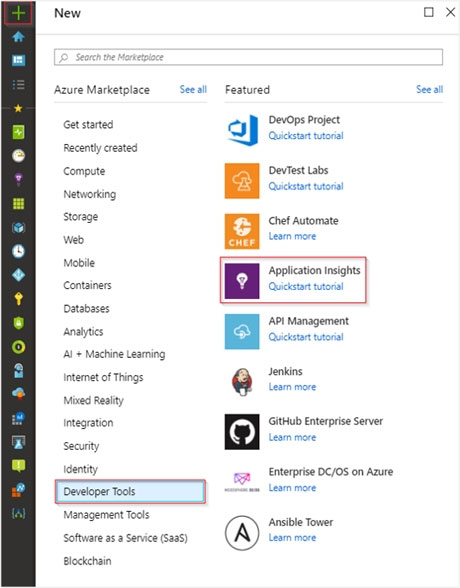
3. Enter the following settings, and then select Review + create.
Name: az400-9940427-main –
Step 2: Configure App Insights SDK
1. Open your ASP.NET Core Web App project in Visual Studio > Right-click on the AppName in the Solution Explorer > Select Add > Application Insights
Telemetry.
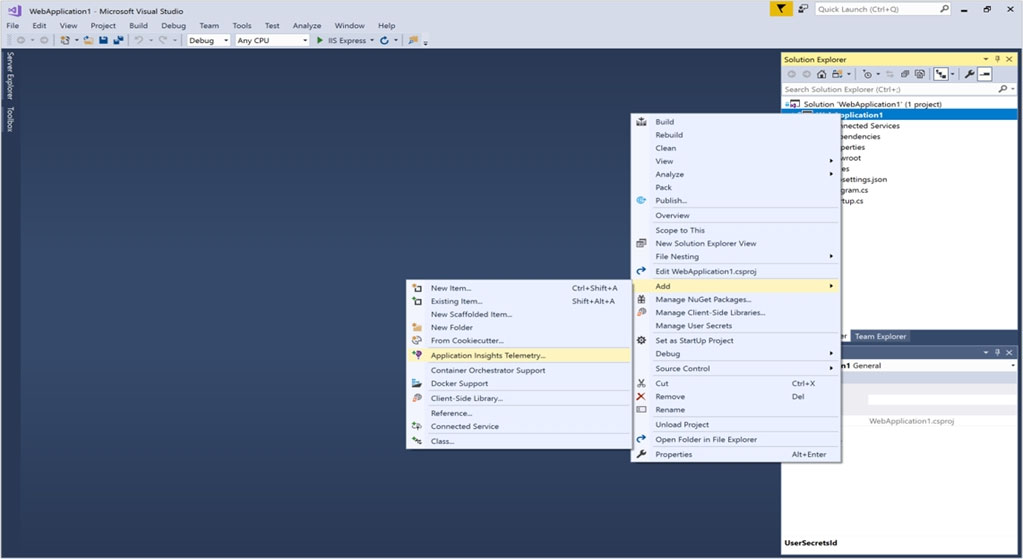
2. Click the Get Started button
3. Select your account and subscription > Select the Existing resource you created in the Azure portal > Click Register.
Reference:
https://docs.microsoft.com/bs-latn-ba/azure/azure-monitor/learn/dotnetcore-quick-start?view=vs-2017