
SIMULATION –
You have a web app that connects to an Azure SQL Database named db1.
You need to configure db1 to send Query Store runtime statistics to Azure Log Analytics.
To complete this task, sign in to the Microsoft Azure portal.
Correct Answer: See explanation below.
To enable streaming of diagnostic telemetry for a single or a pooled database, follow these steps:
1. Go to Azure SQL database resource.
2. Select Diagnostics settings.
3. Select Turn on diagnostics if no previous settings exist, or select Edit setting to edit a previous setting. You can create up to three parallel connections to stream diagnostic telemetry.
4. Select Add diagnostic setting to configure parallel streaming of diagnostics data to multiple resources.

5. Enter a setting name for your own reference.
6. Select a destination resource for the streaming diagnostics data: Archive to storage account, Stream to an event hub, or Send to Log Analytics.
7. For the standard, event-based monitoring experience, select the following check boxes for database diagnostics log telemetry: QueryStoreRuntimeStatistics
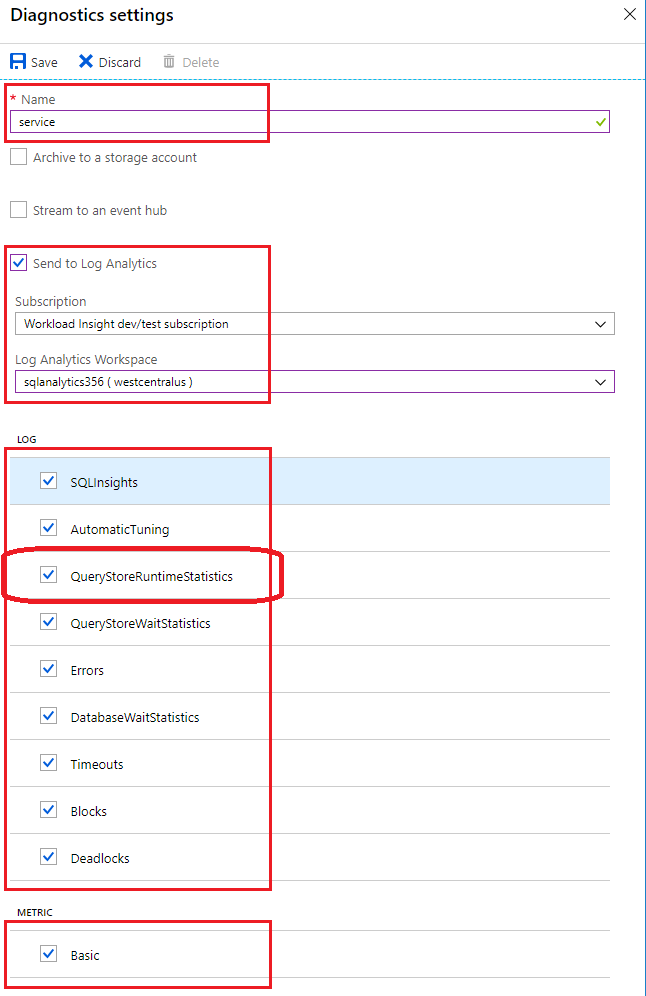
8. For an advanced, one-minute-based monitoring experience, select the check box for Basic metrics.
9. Select Save.