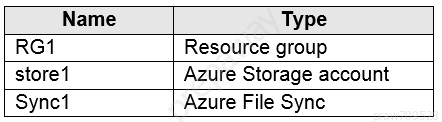
Store1 contains a file share named data. Data contains 5,000 files.
You need to synchronize the files in the file share named data to an on-premises server named Server1.
Which three actions should you perform? Each correct answer presents part of the solution.
NOTE: Each correct selection is worth one point.
- A. Create a container instance
- B. Register Server1
- C. Install the Azure File Sync agent on Server1
- D. Download an automation script
- E. Create a sync group
Correct Answer: BCE
Step 1 (C): Install the Azure File Sync agent on Server1
The Azure File Sync agent is a downloadable package that enables Windows Server to be synced with an Azure file share
Step 2 (B): Register Server1.
Register Windows Server with Storage Sync Service
Registering your Windows Server with a Storage Sync Service establishes a trust relationship between your server (or cluster) and the Storage Sync Service.
Step 3 (E): Create a sync group and a cloud endpoint.
A sync group defines the sync topology for a set of files. Endpoints within a sync group are kept in sync with each other. A sync group must contain one cloud endpoint, which represents an Azure file share and one or more server endpoints. A server endpoint represents a path on registered server.
Reference: https://docs.microsoft.com/en-us/azure/storage/files/storage-sync-files-deployment-guide